C Compilation Objects
To go from human-readable C code to a running program on a computer requires a few steps of processing before being converted to the machine code that ultimately is what the computer runs on the CPU.
This lab will use a few gcc command flags to extract our those intermediate forms of the program we made. To reiterate the compilation process in the C review lesson, there are four main steps in C compilation:
- Preprocessing: The C preprocessor (CPP) formats the source code using macros like
#includeor#define, including needed headers and applying any user-defined changes before passing to the next step - Compilation: The compiler translates C source code into assembly language
- Assembly: The assembler then converts the assembly code into machine code, producing object files,
.oor.obj, as a result - Linking: The linker orders the object files properly and combines them into a single executable program that is ready to run on the target system
Each one of these steps produces distinct products that we can look closer at to understand the process a bit more. In order to do that, we will need another tool to be added to our system PATHs. xxd is a command-line tool that exposes the raw binary and hexadecimal values of files for us. It can be downloaded here for Windows. in order for it to be visible to your PATH easily, copy the xxd.exe inside of the zip file and place it inside of the C:mingw64/bin/ folder. For Linux and Mac, it is probably already installed in the terminal, if not:
- For Linux: Use your package manager to install xxd
- For Mac: Use Brew to install xxd similar to here
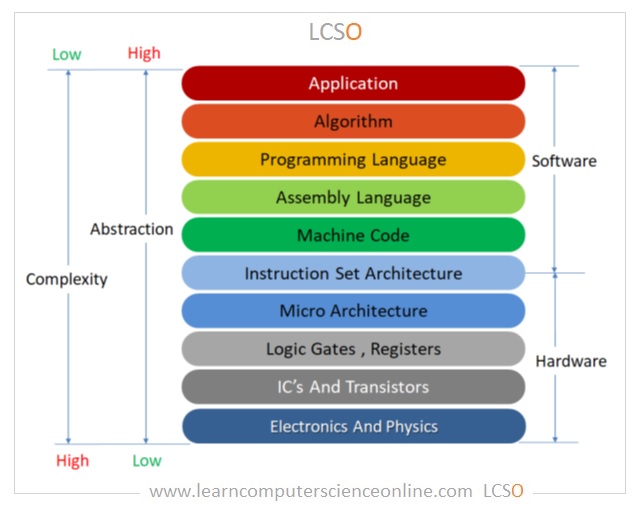
Another level of this lab is the descent down into the abstraction hierarchy from a relatively high-level language to assembly and finally to machine code:
1. Setting up
Creating Test Subjects
- Open a new folder/directory somewhere to store your labs and create a new file named
hello.c. Open it in Sublime Text, or whatever editor you are using, and enter in a simple "Hello World" program:
- Create a second file named
add.cwith the following contents:
- Create a third file named
pre_process.cwith the following contents (its purpose will be revealed later):
// pre_process.c
#define COPY PASTE
#define want_to_be AM

COPY

COPY,COPY

COPYCOPY

#include "include.h"
- Create a fourth file named
include.hwith the following contents (its purpose will be revealed later):
You should have a directory structure like this:
Testing xxd
To understand a little bit about xxd we will use it on one of our simple test subject files.
-
Open a cmd or terminal and navigate to
compile_labusingcd, or wherever you put the files from the previous step. -
Run the command
xxd hello.c. You should see something like this:
00000000: 2f2f 2068 656c 6c6f 2e63 0d0a 2369 6e63  // hello.c..#inc
00000010: 6c75 6465 203c 7374 6469 6f2e 683e 0d0a  lude <stdio.h>..
00000020: 0d0a 696e 7420 6d61 696e 2876 6f69 6429  ..int main(void)
00000030: 0d0a 7b0d 0a09 7072 696e 7466 2822 4865  ..{...printf("He
00000040: 6c6c 6f20 576f 726c 6421 2229 3b0d 0a09  llo World!");...
00000050: 0d0a 0972 6574 7572 6e20 303b 0d0a 7d    ...return 0;..}
This is called the hex dump of the hello.c file. It is the raw information within hello.c rendered into hexadecimal representation alongside its ASCII translation. We can also see it in raw binary.
- Run
xxd -b hello.c. Using the-bflag to create a binary dump:
00000000: 00101111 00101111 00100000 01101000 01100101 01101100  // hel
00000006: 01101100 01101111 00101110 01100011 00001101 00001010  lo.c..
0000000c: 00100011 01101001 01101110 01100011 01101100 01110101  #inclu
00000012: 01100100 01100101 00100000 00111100 01110011 01110100  de <st
00000018: 01100100 01101001 01101111 00101110 01101000 00111110  dio.h>
0000001e: 00001101 00001010 00001101 00001010 01101001 01101110  ....in
00000024: 01110100 00100000 01101101 01100001 01101001 01101110  t main
0000002a: 00101000 01110110 01101111 01101001 01100100 00101001  (void)
00000030: 00001101 00001010 01111011 00001101 00001010 00001001  ..{...
00000036: 01110000 01110010 01101001 01101110 01110100 01100110  printf
0000003c: 00101000 00100010 01001000 01100101 01101100 01101100  ("Hell
00000042: 01101111 00100000 01010111 01101111 01110010 01101100  o Worl
00000048: 01100100 00100001 00100010 00101001 00111011 00001101  d!");.
0000004e: 00001010 00001001 00001101 00001010 00001001 01110010  .....r
00000054: 01100101 01110100 01110101 01110010 01101110 00100000  eturn
0000005a: 00110000 00111011 00001101 00001010 01111101           0;..}
These are showing the same information just in different forms. Often times, when doing low-level work, programmers will use hexadecimal representation as a way to condense the raw binary values to do quicker analysis. You can see its usefulness by how many lines and digits it takes to display the same file in each representation.
We will be using xxd to view the raw information as we compile our code down the abstraction hierarchy. We have seen the top of it, human-readable C code, now lets look at the final executable.
- Run gcc hello.c -o hello.exe or whatever your OS's executable extension is.
- Now run xxd hello.exe.
- Your subsequent terminal scrolling output will tell you there's a lot to go from hello.c to hello.exe.
Lab Questions
- Use
xxdonpreprocess.c. Looking at the first line of characters of both files (including comments), you may be able to pick out common pattern in the characters used.- How long is each character in hex digits?
- Find three and match them up their
charcounterparts. - Use
xxd -b, how many bits does each char take up? Does this make sense with what you know about C's data types?
2. Preprocessing
The first compilation step we will look at is the preprocessing step where gcc parses the .c file and applies any preprocessor macros like #include <...> or #define. To see the basic process, we will use the pre_proces.c file.
-
Run
gcc -E pre_process.c -o pre_process.ito create an expanded source code file -
It will look like this when viewed using Sublime Text:
# 0 "pre_process.c"
# 0 "<built-in>"
# 0 "<command-line>"
# 1 "pre_process.c"


PASTE

PASTE,PASTE

COPYCOPY

# 1 "include.h" 1


I AM included!
# 12 "pre_process.c" 2
- Compare it to what we originally put inside of it. What do you notice?
This small example shows the nature of the preprocessing step in C, it applies simple copy-paste operations on the source code file to prepare it for the rest of the compilation journey. At this level we are still at the human-read able, programming language level of the abstraction hierarchy.
Lab Questions
- Using the same process as above, create
hello.i. Open it in Sublime Text.- Using "Ctrl+F", find your "Hello World" message. Where is it?
- Now find all instances of
printf. What do you notice#include <stdio.h>does for your program. - Every function in C, if not defined at the top before
main, must have both a declaration and a definition defined. Either way a definition needs to be given to use the file. Try to find a definition for astdio.hfunction. Can you? What does this mean?
2. Compilation
The second step of the compilation process is actually compiling C code into assembly code. This step takes us our first level down the abstraction hierarchy, going from easily human-readable programming languages to assembly.
Assembly code is a slightly easier interface to program a computer at a low-level. It boils down to labeled machine-code instructions that inform their function. For example, the assembly instruction add eax, ebx (add the number in eax and ebx together) is translated into 0x03C3into machine-code hex. Where 03 represents the add instruction and C3 the operands eax and ebx.
At this step we will see the assembly instructions, know that they are still not the code that is run on the computer. It is still a textual representation of computer code that exists to make it easier for humans to read.
- Run
gcc -S hello.c -o hello.asmand openhello.asmin Sublime Text:
    .file   "hello.c"
    .text
    .section .rdata,"dr"
.LC0:
    .ascii "Hello World!\0"
    .text
    .globl  main
    .def    main;   .scl    2;  .type   32; .endef
    .seh_proc   main
main:
    pushq   %rbp
    .seh_pushreg    %rbp
    movq    %rsp, %rbp
    .seh_setframe   %rbp, 0
    subq    $32, %rsp
    .seh_stackalloc 32
    .seh_endprologue
    call    __main
    leaq    .LC0(%rip), %rax
    movq    %rax, %rcx
    call    __mingw_printf
    movl    $0, %eax
    addq    $32, %rsp
    popq    %rbp
    ret
    .seh_endproc
    .def    __main; .scl    2;  .type   32; .endef
    .ident  "GCC: (MinGW-W64 x86_64-msvcrt-posix-seh, built by Brecht Sanders, r1) 15.2.0"
This is the translated assembly code from our hello.c notice how all the extra information at the top of the preprocessed file is not included here, rather the assembly contains only the reference to the code we need to call, call __mingw_printf. Ultimately, printf's assembly code is pre-compiled somewhere in the mingw library and will be linked later in the process.
Lab Questions
- Its not obvious how the
call __mingw_printfknows what to print while inmain:.- Find your message in the assembly.
- See where it is located and use that information to look near the call to
__mingw_printfand locate when your message is used in main.
- Using the same process as we used to create
hello.asm, createadd.asmfromadd.c.- We used very recognizable numbers for the addition. Find them in the assembly.
- Using context clues, try to figure out where they are added. Be careful, there can be more than one add operation in a file. For example,
hello.asmalso has anaddqop at the end of it despite having no adding in the program. Find the correct one.
3. Assembly
Once the assembly is generated, it must be converted to its machine-code translation. This is where we step over the line completely and there is no human-readable components other than debug information. This step squarely sits us at the machine code layer in the abstraction hierarchy, where we are talking directly to the computer as close as we can as programmers. The object (.obj) files that the next step produces represent structured binary files containing machine code alongside metadata like symbol tables and relocation information. This structure is what makes linking possible — the linker reads that metadata to know how to stitch the pieces together. As such we now switch over from Sublime Text, back to xxd for viewing.
These are pieces of code that are ran directly on the CPU, however the path to send it there is very different based on the OS on the system (if there is one!). Each .obj represents a snippet of machine-code that will be formatted for the host system for later running — either linked together with other .obj files into a final executable, or standing alone to be wrapped in OS-specific executable formatting, like PE on Windows or ELF on Linux.
-
Run
gcc -c hello.c -o hello.obj. -
Follow up with:
xxd hello.obj:
00000000: 6486 0700 0000 0000 1002 0000 1400 0000  d...............
00000010: 0000 0400 2e74 6578 7400 0000 0000 0000  .....text.......
00000020: 0000 0000 3000 0000 2c01 0000 d401 0000  ....0...,.......
00000030: 0000 0000 0300 0000 2000 5060 2e64 6174  ........ .P`.dat
00000040: 6100 0000 0000 0000 0000 0000 0000 0000  a...............
... (Run it on your own)
This may seem like gibberish even with the ASCII representation on the side. However, the large section of random characters in the middle represent machine-code instructions and their operands being sent to the CPU for Fetching, Decoding and Execution.
Lab Questions
- Where is your "Hello World" message? Does its position tell you when the information is used?
- Can you find the place that is looking to be linked with
printf's machine-code? - Go into
add.c, change both of the number being added to0xFFFFFFFF. Do the process above and makeadd.obj. Find where there are a bunch off's bunched up. - Go back into
add.c, change both numbers to this0x0DF0EFBE. Create the new.obj. Look inside the hex for the answer to the question, "Moo..., The best kind of food is..." near where you saw all thef's.
4. Linking
This is the final step where the final executable is put together and made ready to run for the host system. If you followed along since the beginning you would have seen what the final executable looks like in xxd, a very large dump contains a lot of metadata and machine code instructions. A lot goes into even just printing "Hello World".